A great home theater used to mean shelves of physical discs, a tangle of audio receivers, and an entertainment center that swallowed the living room. Fast fiber internet and modern software have thrown out that rulebook. Today anyone can enjoy a sharp, theater-quality experience without leaving the couch.
Still, a huge catalog does not guarantee a great evening. Poor app choices, aging hardware, and a badly configured home network are the usual culprits behind blurry pictures and endless menu hunting.
If you want better picture quality and fewer hours spent troubleshooting, this guide walks through every piece of a smooth, reliable home streaming ecosystem.

1. Organize Your Content Rotation
Streaming is more fragmented than ever. Studios keep pulling their catalogs back to their own platforms, so relying on a single service means missing a large share of film history.
Say it is Friday night and you are browsing for something to watch on Netflix. What you see is a carefully curated library built around the company's own productions. Their big-budget originals are excellent, but deep archives of classics and independent cinema are not their strength.
A hybrid approach keeps costs sane. Pick one or two paid platforms as your anchors, then fill the gaps with free, ad-supported streaming channels. You get a wide library to browse while your fixed monthly spending stays under control.
Hybrid Model Strategy
- Primary Anchors: Pick 1-2 paid platforms for premium originals
- Supplement: Add free, ad-supported streaming TV apps
- Result: A broad library with predictable monthly costs
2. Choose a Central App Environment
The app you use to navigate your media shapes your everyday experience. Most people stick with the interface that shipped on their smart TV, yet those built-in platforms tend to be sluggish and crowded with promotions.
If you want to find good movies across several services without bouncing between ten apps, a centralized media aggregator is worth considering.
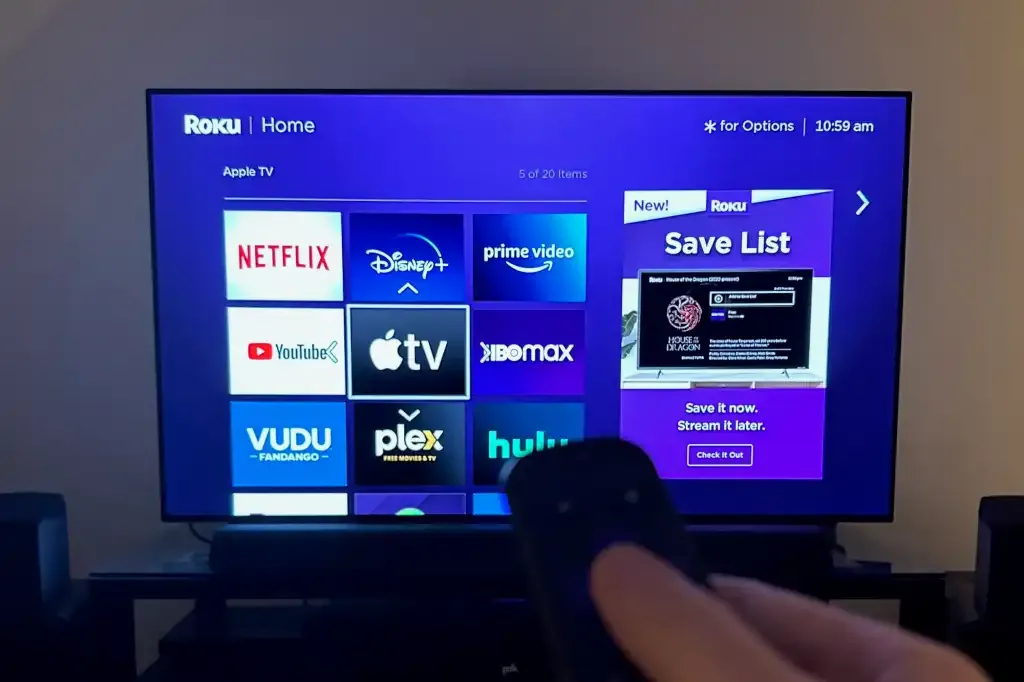
Tools such as Plex, Apple TV, or custom dashboard players can pull your accounts into a single search bar. Look up a title and the app shows which of your subscriptions carries it, so you can press play right away and skip each service's menus altogether.
Native Smart TV Apps
- Slow performance and long loading times
- Packed with promotional ads
- Cluttered home screen
- Weak cross-platform search
Centralized Media Aggregator
- One search across every service
- Clean, ad-free interface
- Instant playback from one dashboard
- Multiple accounts synced together
3. Bring Live Broadcasts Into the Mix
On-demand services handle pre-recorded films beautifully, but cord-cutters often hit a wall with live events, breaking news, or international channels. Traditional on-demand apps simply were not designed for real-time delivery.
To fill that gap, many home theater fans now add custom network playlists to their setups.
If you would like global networks and live entertainment packages sitting beside your on-demand apps, a platform like RealMIPTV offers one channel lineup that runs right inside the streaming devices you already own.
Running live channels through the same player keeps everything in one place, so you stop switching TV inputs or juggling extra boxes.

4. Optimize Your Hardware for Smooth Decoding
The device that processes your stream has a big say in how sharp a film looks. Digital video has to be compressed heavily before it can travel across the internet, and that job belongs to specialized broadcast equipment called an iptv encoder.
When a distributor runs its feed through a modern iptv encoder, huge 4K files become compact digital packages. Once that package reaches your home, your streaming device has to use its own processing power to unpack it into a clean picture.
Cheap generic sticks and older TVs with weak processors struggle to unpack those modern files quickly. A premium dedicated media player brings the graphics horsepower needed to decode complex video smoothly, which cuts out random pixelation and dropped frames.
IPTV Encoder: The Hidden Hero
A modern IPTV encoder squeezes massive 4K data into lightweight packages, and your streaming device unpacks them into the picture you see. Without solid hardware decoding, even the fastest internet connection cannot prevent buffering and pixelation.
5. Audit Your Home Network
Top-tier hardware still stumbles when the home network has a bottleneck. High-definition video needs a steady, uninterrupted flow of data, and even light wireless interference can drag a crisp 4K picture down to blurry standard definition.
To keep movies at full quality, put these network habits into practice:
Go Wired with Ethernet
Run an Ethernet cable from your router straight to your main TV box. It sidesteps the signal loss caused by walls and crowded Wi-Fi.
Use the 5 GHz Band
If a cable is not practical, join your router's 5 GHz network. It delivers noticeably faster speeds and suffers less interference from household electronics.
Prioritize Your Streaming Device
Open your router's admin panel and turn on Quality of Service so your media player always gets priority bandwidth.
"Even the best streaming hardware will fail if your home data network has a bottleneck. High-definition media requires an unshakeable, steady stream of data."
6. Curate and Rotate Your Monthly Lineup
The last piece is money management. With so many specialized iptv providers and niche cinema apps around, recurring charges can quietly pile up.
The smartest approach is active subscription rotation. Digital apps carry no long-term contracts, so there is no reason to keep every platform running at once.
Keep a core live iptv service for daily news, sports, and live events. Then subscribe to individual movie apps for a month at a time whenever a big new season arrives. After you finish your watchlist, cancel that app and move to a different platform the next month. Your catalog stays fresh and your wallet stays happy.
For a closer look at how different platforms fit a modern budget, check out the Best Streaming Apps in 2026 video guide. It shows how to choose anchor apps that match your own viewing style and keep your home setup efficient.
Subscription Rotation Strategy
- Keep Your Core Active: Maintain a live IPTV service for daily news, sports, and live events
- Rotate Movie Apps: Subscribe for 30 days when a major new season drops
- Cancel and Switch: Cancel once you have watched your list, then try a different platform
- Result: Fresh content without a bloated bill
Written by Marcus Reynolds
Senior Tech & Streaming Analyst
Sources: Cineby Research, industry streaming data
Cineby — Cinema, series, music, and everything in between